restPlayground API

Click on index link to jump to section.
restPlayground is exactly what it says, it's a small backend API that allows you to perform various CRUD actions through code that calls the API. It's a simple API that allows the following:
All the data can be found below in the guide to making calls to the API. I created it because while doing my degree I learned very quickly that the ability to call and receive data from APIs is absolutely necessary for modern day web development. It played a big part in our learning of JavaScript, HTML, React, and more. There are lots of other free APIs that can be found on the web. However, not all are free, and not all do exactly what I wanted them to do. So, I created restPlayground API as a way of practicing my own coding techniques. Both in backend development, as well as frontend developemnt. There are several options built in that allow you to test all kinds of CRUD actions, in a way that resembles how you might use it.
Click here to see the table of contents...The API is hosted on this website, and can be called through the following URI:
https://digitaljunctioncymru.co.uk/api/restplayground.php
https://digitaljunctioncymru.co.uk/api/restplayground.php
restplayground API accepts two very basic calls on the main route. Sending a basic POST request to the API will result in the API returning all the data sent to it being displayed in the web page. So the following HTML code:
Code example

<form action="https://digitaljunctioncymru.co.uk/api/restplayground.php" method="POST">
    <label for="name">Name:</label>
    <input type="text" name="name" />
    <button type="submit">Submit</button>
</form>
would cause the API to respond with a web page that looks something like this:
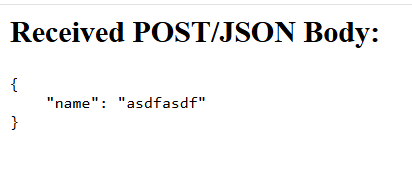
restplayground API will also accept a GET request to the main route, and reflect those back to you. You can also simply type something like https://digitaljunctioncymru.co.uk/api/restplayground.php?name=dave&user=asdfasdfsadf into the browser bar, and it will return the following in the browser:
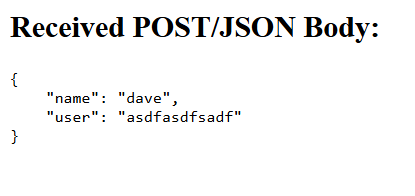
This allows you to practice making forms using HTML, and see what data gets posted from your form. Helping to understand how HTML forms work in a simpler manner. It will also accept a POST request using JavaScript fetch(url) requests. It will return descriptive error messages for malformed requests and other errors for .then(res => res.json()).then(data => console.log(data)) JavaScript calls.
More advanced routes are available. These allow you to make requests for samle data such as songs, films, or users. See below for a brief description on how the other routes work.
Click here to see the table of contents...restplaygroundAPI allows you pass a parameter via the URL that allows you to customise the response you get from the API. The following "reply" routes are available as of now. To call the route simply use the following URI https://digitaljunctioncymru.co.uk/api/restplayground.php?reply=<routenum>, replacing <routenum> with the number describing one of the routes below:
Simple reflector (?reply=1)
Echos back the POST/JSON/GET data as a JSON response.
JSON "get-echo" (?reply=2)
Returns all GET parameters (except reply) as a JSON “get-echo”.
Random song list (?reply=3)
Generates and returns a JSON list of random songs.
Random film list (?reply=4)
Generates and returns a JSON list of random films.
Random user list (?reply=5)
Generates and returns a JSON list of random users.
Static song dataset (?reply=6)
Provides GET/PUT/DELETE access to a static songs dataset.
Static film dataset (?reply=7)
Provides GET/PUT/DELETE access to a static dataset of films.
Static user dataset (?reply=8)
Provides GET/PUT/DELETE access to a static dataset of users.
When calling the routes that generate randoms lists of data for songs, films, and users, you are given the add option of specifying the number of records you would like to receive. This can range from 1-50, with a default setting of 5 if no &count= parameter is set. Some examples are below:
?reply=3&count=10   → return 10 random songs
?reply=4&count=25   → return 25 random movies
?reply=5&count=3    → return 3 random users
Below is a list of all the possible routes that are available while using restplaygroundAPI.
Click here to see the table of contents...The default route of the REST Playground API lets beginners easily test POST requests. When you send data using POST, the API reads it and returns a simple HTML page showing exactly what you sent. This makes it ideal for learning how APIs receive form data and JSON.
It is called from the following URI:
https://digitaljunctioncymru.co.uk/api/restplayground.phpWhen the POST request is sent, either as form data or JSON, the API reads the data and then displays it as a simple HTML page. The data is not a JSON response, but instead formatted HTML for easy learning and debugging.
Example code for using default POST route with HTML forms:
<form action="https://digitaljunctioncymru.co.uk/api/restplayground.php" method="POST">
    <label for="name">Name</label>
    <input name="name" type="text" />
    <button type="submit">Submit</button>
</form>
After a POST call is made to the API, it will return one of several status codes and responses. These are as follows:
200 OK: A response of 200 means that the POST request was successful.
400 Bad Request/Malformed JSON: Returned when an attempt to POST invalid JSON is made.
403 Forbidden/Blocked IP: restplaygroundAPI will temporarily block your IP after repeated rate-limit violation.
429 Too many requests: Returned when you exceed 20 requests in 10 seconds.
Click here to see the table of contents...The reply=1 route allows beginners to send POST data (either form data or JSON) and have the API return the exact same data back, but as a JSON response. This makes it perfect for learning how JSON APIs work and how applications send and receive structured data.
It is called from the following URI:
https://digitaljunctioncymru.co.uk/api/restplayground.php?reply=1When a POST request is sent to this route, the API reads the incoming data and returns it as clean, formatted JSON. Unlike the default route, reply=1 never returns HTML―only JSON. This makes it ideal for apps, fetch() calls, and JavaScript testing.
Example code for sending a POST request to the reply=1 route using JavaScript:
            fetch("https://digitaljunctioncymru.co.uk/api/restplayground.php?reply=1", {
                method: "POST",
                headers: {
                    "Content-Type": "application/json"
                },
                body: JSON.stringify({ name: "Emma", level: 5 })
            })
            .then(res => res.json())
            .then(data => console.log(data));
After a POST call is made to reply=1, the API may return several different status codes depending on the type of request and whether any errors are detected. These are as follows:
200 OK: The POST request was successful, and the API returned your submitted data in JSON format.
400 Bad Request / Malformed JSON: Returned when invalid JSON is sent (for example, missing quotes or trailing commas).
403 Forbidden / Blocked IP: The API temporarily blocks your IP after repeated rate-limit violations.
429 Too Many Requests: Returned when more than 20 requests are sent within 10 seconds.
Click here to see the table of contents...The reply=2 route is used to test GET requests. This route takes the GET parameters that you include in the URL, ignores the reply parameter, and returns all the other GET values back to you in JSON format. This makes it a perfect way for beginners to learn how query strings work and how APIs read URL-based parameters.
It is called from the following URI:
https://digitaljunctioncymru.co.uk/api/restplayground.php?reply=2When you add GET parameters to the URL, such as ?name=Dave&age=30, the API reads them and returns them as clean JSON. The reply=2 route never returns HTML—only JSON, making it ideal for fetch() calls, JavaScript apps, and debugging URL queries.
Example code for sending a GET request to the reply=2 route using JavaScript:
            fetch("https://digitaljunctioncymru.co.uk/api/restplayground.php?reply=2&name=Dave&age=30")
                .then(res => res.json())
                .then(data => console.log(data));
After a GET call is made to reply=2, the API may return several status codes. These are as follows:
200 OK: The GET request was successful, and the API returned your GET parameters in JSON format.
400 Bad Request: Returned when no GET parameters (other than reply=2) were provided.
403 Forbidden / Blocked IP: The API temporarily blocks your IP after repeated rate-limit violations.
429 Too Many Requests: Returned when more than 20 requests are made within 10 seconds.
Click here to see the table of contents...The reply=3 route generates a list of random songs. This is useful for beginners learning how APIs return dynamic JSON data. Each time you call this route, the API creates random song entries including track number, title, artist, and song length.
It is called from the following URI:
https://digitaljunctioncymru.co.uk/api/restplayground.php?reply=3By default, the API returns 5 random songs. However, you can control how many songs are generated by including the count parameter in the URL. The count can be any number from 1 to 50.
Example of requesting 10 random songs:
https://digitaljunctioncymru.co.uk/api/restplayground.php?reply=3&count=10The API returns each song as a JSON object containing the following fields:
Example JavaScript code for calling reply=3 with a count parameter:
            fetch("https://digitaljunctioncymru.co.uk/api/restplayground.php?reply=3&count=5")
                .then(res => res.json())
                .then(data => console.log(data));
After calling reply=3, the API may return several different status codes depending on the request. These are as follows:
200 OK: The request was successful, and a list of random songs was returned.
403 Forbidden / Blocked IP: Returned when the API temporarily blocks your IP after repeated rate-limit violations.
429 Too Many Requests: Returned when more than 20 requests are made within 10 seconds.
Click here to see the table of contents...The reply=4 route generates a list of random movies. This route is designed to help beginners understand how APIs return structured JSON data. Every time you call this route, the API creates movie entries including a movie number, title, genre, release year, and duration.
It is called from the following URI:
https://digitaljunctioncymru.co.uk/api/restplayground.php?reply=4By default, the API returns 5 random movies. You can control how many movies are returned by using the count parameter, which accepts values between 1 and 50.
Example of requesting 10 random movies:
https://digitaljunctioncymru.co.uk/api/restplayground.php?reply=4&count=10The API returns each movie as a JSON object containing the following fields:
Example JavaScript code for calling reply=4 with a count parameter:
            fetch("https://digitaljunctioncymru.co.uk/api/restplayground.php?reply=4&count=5")
                .then(res => res.json())
                .then(data => console.log(data));
After calling reply=4, the API may return several status codes depending on the request. These include:
200 OK: The request was successful and a list of random movies was returned.
403 Forbidden / Blocked IP: Returned when the API temporarily blocks your IP because of repeated rate-limit violations.
429 Too Many Requests: Returned when more than 20 requests are made within 10 seconds.
Click here to see the table of contents...The reply=5 route generates a list of random users. This route is designed to help beginners learn how APIs can return complex, structured JSON objects. Each call produces user profiles containing names, locations, contact details, and unique identifiers.
It is called from the following URI:
https://digitaljunctioncymru.co.uk/api/restplayground.php?reply=5By default, the API returns 5 random users. You can customise this by using the count parameter, which accepts any value between 1 and 50.
Example of requesting 10 random users:
https://digitaljunctioncymru.co.uk/api/restplayground.php?reply=5&count=10Each user generated by the API includes the following fields:
Example JavaScript code for calling reply=5 with a count parameter:
            fetch("https://digitaljunctioncymru.co.uk/api/restplayground.php?reply=5&count=5")
                .then(res => res.json())
                .then(data => console.log(data));
After calling reply=5, the API may return several different status codes depending on the request. These include:
200 OK: The request was successful, and a list of random users was returned.
403 Forbidden / Blocked IP: Returned when the API temporarily blocks your IP after repeated rate-limit violations.
429 Too Many Requests: Returned when more than 20 requests are made within 10 seconds.
Click here to see the table of contents...The reply=6, reply=7, and reply=8 routes are used to access and modify static datasets inside the REST Playground API. Unlike the random data routes, these three routes return a fixed predefined list that can be retrieved, updated, or deleted using standard HTTP methods.
Each route corresponds to a different static dataset:
These routes support the following HTTP methods:
The routes are called using the following base URIs:
https://digitaljunctioncymru.co.uk/api/restplayground.php?reply=6
https://digitaljunctioncymru.co.uk/api/restplayground.php?reply=7
https://digitaljunctioncymru.co.uk/api/restplayground.php?reply=8Calling any of these routes using GET will return the full static dataset in JSON format:
            fetch("https://digitaljunctioncymru.co.uk/api/restplayground.php?reply=6")
                .then(res => res.json())
                .then(data => console.log(data));
A PUT request is used to update a single item within the dataset. Each dataset requires a specific ID field (for example, track_number for songs, movie_number for movies, or user_number for users). Only fields that exist in the dataset may be updated.
            fetch("https://digitaljunctioncymru.co.uk/api/restplayground.php?reply=6", {
                method: "PUT",
                headers: { "Content-Type": "application/json" },
                body: JSON.stringify({
                    track_number: 1,
                    title: "Updated Song Title"
                })
            })
            .then(res => res.json())
            .then(data => console.log(data));
A DELETE request removes a single item from the dataset. The required ID field must be provided either in the JSON body or in the URL query string.
            fetch("https://digitaljunctioncymru.co.uk/api/restplayground.php?reply=7&movie_number=3", {
                method: "DELETE"
            })
            .then(res => res.json())
            .then(data => console.log(data));
The API may return a variety of status codes depending on the method used and whether the request was valid. These include:
200 OK: The GET, PUT, or DELETE request was handled successfully.
400 Bad Request: Returned when required fields are missing or invalid (for example: missing track_number, movie_number, or user_number for PUT/DELETE).
404 Not Found: Returned when attempting to update or delete an item that does not exist.
403 Forbidden / Blocked IP: Returned when the API temporarily blocks your IP after repeated rate-limit violations.
405 Method Not Allowed: Returned when using an unsupported HTTP method such as POST for these routes.
429 Too Many Requests: Returned when more than 20 requests are sent within 10 seconds.
Click here to see the table of contents...The static songs dataset is used by the reply=6 route. Unlike the random song generator, this dataset contains a fixed list of songs that never changes unless updated using a PUT or DELETE request. Each song is represented as a JSON object with several descriptive fields.
Each song contains the following fields:
mm:ss format.The full static dataset included in the API is shown below:
            [
                {
                    "track_number": 1,
                    "title": "Neon Skies",
                    "artist": "The Orbits",
                    "length": "3:42"
                },
                {
                    "track_number": 2,
                    "title": "Electric Pulse",
                    "artist": "Echo Vector",
                    "length": "4:05"
                },
                {
                    "track_number": 3,
                    "title": "Crystal Horizon",
                    "artist": "Skyline Radio",
                    "length": "3:58"
                },
                {
                    "track_number": 4,
                    "title": "Digital Heartbeat",
                    "artist": "Retro Circuit",
                    "length": "4:30"
                },
                {
                    "track_number": 5,
                    "title": "Midnight Drive",
                    "artist": "Neon Dreams",
                    "length": "3:20"
                }
            ]
When calling the dataset with a GET request, the API returns this same list in JSON format:
            fetch("https://digitaljunctioncymru.co.uk/api/restplayground.php?reply=6")
                .then(res => res.json())
                .then(data => console.log(data));
The static movies dataset is used by the reply=7 route. This dataset contains a fixed set of movie entries that remain unchanged unless modified using a PUT or DELETE request. Each movie is represented as a JSON object with fields describing the title, genre, year, and duration.
Each movie object includes the following fields:
The full static movie dataset included in the API is shown below:
            [
                {
                    "movie_number": 1,
                    "title": "Shadow Protocol",
                    "genre": "Sci-Fi",
                    "year": 2018,
                    "duration": "112 min"
                },
                {
                    "movie_number": 2,
                    "title": "Neon Horizon",
                    "genre": "Thriller",
                    "year": 2021,
                    "duration": "98 min"
                },
                {
                    "movie_number": 3,
                    "title": "Silent Code",
                    "genre": "Drama",
                    "year": 2015,
                    "duration": "105 min"
                },
                {
                    "movie_number": 4,
                    "title": "Digital Frontier",
                    "genre": "Action",
                    "year": 2020,
                    "duration": "123 min"
                },
                {
                    "movie_number": 5,
                    "title": "Lost Frequency",
                    "genre": "Mystery",
                    "year": 2012,
                    "duration": "101 min"
                }
            ]
Calling the route using GET will return this dataset in JSON format:
            fetch("https://digitaljunctioncymru.co.uk/api/restplayground.php?reply=7")
                .then(res => res.json())
                .then(data => console.log(data));
The static users dataset is used by the reply=8 route. This dataset contains predefined user profiles that only change when modified by a PUT or DELETE request. Each entry represents a fictional user and includes several fields commonly found in user records.
Each user object includes the following fields:
The full static user dataset included in the API is shown below:
            [
                {
                    "user_number": 1,
                    "user_id": "user_001",
                    "first_name": "Dave",
                    "last_name": "Rowlands",
                    "email": "dave.rowlands@example.com",
                    "town": "Cardiff",
                    "country": "UK",
                    "telephone": "(01123) 456-7890",
                    "pet": "dog"
                },
                {
                    "user_number": 2,
                    "user_id": "user_002",
                    "first_name": "Sarah",
                    "last_name": "Taylor",
                    "email": "sarah.taylor@testmail.net",
                    "town": "Bristol",
                    "country": "UK",
                    "telephone": "(01987) 321-6543",
                    "pet": "cat"
                },
                {
                    "user_number": 3,
                    "user_id": "user_003",
                    "first_name": "James",
                    "last_name": "Cole",
                    "email": "james.cole@mailservice.org",
                    "town": "Manchester",
                    "country": "UK",
                    "telephone": "(01555) 987-1234",
                    "pet": "fish"
                },
                {
                    "user_number": 4,
                    "user_id": "user_004",
                    "first_name": "Megan",
                    "last_name": "Evans",
                    "email": "megan.evans@devmail.co",
                    "town": "Newport",
                    "country": "UK",
                    "telephone": "(01777) 246-8103",
                    "pet": "bunny"
                },
                {
                    "user_number": 5,
                    "user_id": "user_005",
                    "first_name": "Chris",
                    "last_name": "Wilson",
                    "email": "chris.wilson@example.com",
                    "town": "Leeds",
                    "country": "UK",
                    "telephone": "(01444) 555-0199",
                    "pet": "bird"
                }
            ]
When calling the route with a GET request, the API returns this dataset as structured JSON:
            fetch("https://digitaljunctioncymru.co.uk/api/restplayground.php?reply=8")
                .then(res => res.json())
                .then(data => console.log(data));